Book Transforms
Notes on placing a book mesh in Vintage Story, written while building the floor pile. Everything here was checked against the game's own assets: the pile layouts are traced from vanilla clutter shapes and land within 0.0004 of a texture pixel, and the C# was re-run against an independent model of the same maths before being trusted.
If you are only playing the mod, you want the player guide instead.
The book model
Both vanilla book families — lore-book-* and the writable book-* — use one shape,
block/clutter/bookshelves/small-normal, and one groundStorageTransform. That is why they
interchange freely in a pile.
In the shape file the book stands upright, and its dimensions in sixteenths of a block are:
| Axis | Size | What it is |
|---|---|---|
| X | 1.9 | thickness, cover to cover |
| Y | 6.0 | page height |
| Z | 4.8 | page width, spine at +Z |
The 1.9 matters more than it looks: every vanilla pile stacks books exactly 1.9 apart, so a layout that uses the same ladder has books touching with no gap and no interpenetration.
The transform stack
A book in a pile is moved twice, and the second stage has to account for the first.
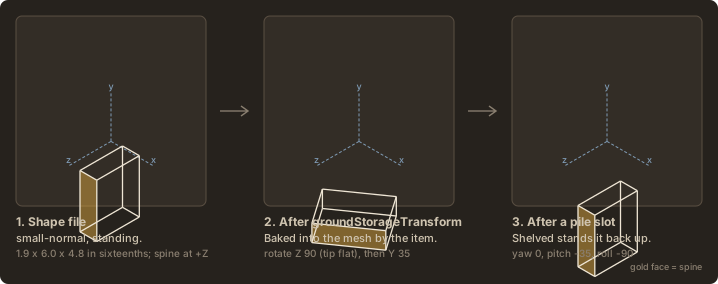
Stage 1 is the item's own groundStorageTransform, baked into the mesh before the block entity
ever sees it. For books that is rotation: { x: 0, y: 35, z: 90 } about origin: (0.5, 0.05, 0.5)
with a small translate — Z 90 tips the book flat, Y 35 turns it.
Stage 2 is the pile slot, applied by BlockEntityBookPile.genTransformationMatrices:
The trailing translate puts the rotation through (0.5, 0, 0.5) — the block's horizontal centre at
floor level, not the book's own centre. The book's centre sits about (0.015, 0.053, 0.049)
off that pivot, so a yaw rotates it slightly eccentrically. That is free character in a messy pile
and a nuisance when matching vanilla exactly.
A slot's angles are not the book's angles
yawDeg/pitchDeg/rollDeg are whatever cancels stage 1 and lands on the pose you want.
Standing a book upright is the clearest case: it needs pitch -35, roll -90, not a plain
roll -90, because the baked-in Y 35 sits between the tip and the slot rotation.
To solve a slot for a wanted world orientation R:
then read Y-X-Z Euler angles off that product Q:
tools/bookpile_geometry.py implements this, and asserts the reconstruction matches before
returning — a bad decomposition can never reach the config.
Conventions worth knowing
These cost the most time, and none are obvious from the JSON.
Rotation order is Z, then Y, then X. A shape element's matrix is built Rx · Ry · Rz, so a
vertex meets Rz first. ModelTransform composes the same way — feeding it rotation: (0, 35, 90)
and pushing the book's own axes through AsMatrix gives:
| Book axis | Result | Ry(35) · Rz(90) |
Rz(90) · Ry(35) |
|---|---|---|---|
| +Y (up) | (-0.819, 0.000, 0.574) |
✅ matches | (-1.000, 0, 0) |
| +Z (spine) | (0.574, 0.000, 0.819) |
✅ matches | (0, 0.574, 0.819) |
Getting this backwards produces poses that look plausible on axis-aligned books and fall apart the moment one is tilted.
Matrixf is a mutating builder that post-multiplies. new Matrixf().RotateYDeg(a).RotateXDeg(b)
yields Ry · Rx, and each call changes the instance rather than returning a fresh one. Two poses
from one instance need two instances.
Matrixf.Values is column-major. The contribution of each local axis to world Y lives at
indices 1, 5, 9 — that is row 1, not column 1.
origin is a pivot, translation is applied after the rotation. Both are in block units.
Tracing a vanilla clutter pile
Vanilla's bookpile1 … bookpile5 are a free source of hand-authored layouts, and they follow one
convention throughout: rotationOrigin = from + (2.6, 3.0, 0), which holds for every book in
every one of those shapes. Books sit at rotationZ: 90 with rotationY carrying all the variation.
The lesson from reading them: vanilla piles get their messy look almost entirely from yaw
spread, not from positional scatter. bookpile1 spreads yaw across about 160° while its four
columns wander by less than a texture pixel.
To convert an element into a slot, take its world bounding box under Rx · Ry · Rz about its
rotationOrigin, then place ours on the same horizontal centre with its base at the same height.
Read each element's own child bounds rather than assuming the standard book box — bookpile5
contains one larger model, and assuming otherwise puts it in the wrong place.
Beware rotationY sign when reusing vanilla angles: a slot needs rotationY - 35 to cancel the
bake.
Collision height for a tilted pose
A pile's selection box has to cover the tallest book, and once a layout stands books upright or props them at an angle you cannot assume a flat 1.9/16.
The trap is using the mesh's bounding box. The ground transform already yawed the book 35°, so
its AABB is 0.479 wide against the book's true 0.375 — rotate that and the height overshoots by up
to 0.141. Use the book's own oriented half-extents (0.1875, 0.059375, 0.15) and turn them by
slotRotation · RotY(35):
reach = |m[1]| · halfLength + |m[5]| · halfThickness + |m[9]| · halfDepth
top   = slot.Y + centreHeight + reach
BookPileUtil.SlotTopHeight does this and is exact for every pose in the shipped config.
Held transforms
The same conventions govern the held book stack, with different anchors. The shapes centre on
x/z = 8 with their base at y = 0, so a single transform can anchor on something meaningful:
| Transform | Origin | What it anchors |
|---|---|---|
guiTransform |
(0.5, 0.132, 0.5) |
the stack's visual centre, so the icon sits centred in a slot |
fpHandTransform |
(0.5, 0, 0.5) |
the base, so the stack rests on the palm in first person |
tpHandTransform |
(0.5, 0, 0.5) |
the base, with rotation.z: -90 laying it across the hand |
tpOffHandTransform |
(0.5, 0, 0.5) |
the same for the left hand, mirrored a few degrees |
groundTransform |
(0.5, 0, 0.5) |
the base, scaled up for the dropped item |
One thing that is easy to assume and is not true of ModelTransform itself: scale does not
multiply the translation. Building the same transform at scale 1, 2 and 4 leaves the matrix's
translation column at exactly the value you wrote.
translate 0.5, scale 1  ->  translation column = (0.5000, 0.0000, 0.0000)
translate 0.5, scale 2  ->  translation column = (0.5000, 0.0000, 0.0000)
translate 0.5, scale 4  ->  translation column = (0.5000, 0.0000, 0.0000)
If a held item appears to move when you rescale it, the coupling is coming from further down the
render path — the hand attach point composes its own matrices on top, and third-person adds a yaw
of its own, which is why tpHandTransform numbers look nothing like the first-person ones. Tune
hand transforms against the running game rather than reasoning about them in isolation.
Regenerating the figures
Every diagram on this page is generated from the mod source, so it cannot drift from what the game draws:
| Tool | Reads | Writes |
|---|---|---|
tools/render_layout_icons.py |
the Cairo bar tables in BookPileLayoutIcons.cs |
bookpile-layouts.svg |
tools/render_layout_shapes.py |
config/bookpile-layout.json |
bookpile-shapes.svg |
tools/render_transform_diagram.py |
tools/bookpile_geometry.py |
book-transforms.svg |